Ford SID212EVO No-Start Countdown: Why It Happens and How to Stop It
A SID212EVO “no start in X miles” countdown starts because the ECU believes the SCR system cannot meet its emissions checks.
Topping up AdBlue only helps if the warning came from low level alone.
Most countdowns link to P20E8, P204F, P207F, or P20EE.
You turn the key.
The van starts.
Then you see it: “No start in 500 miles” or similar wording.
It feels like you’ve got time.
In reality, this is when you either fix it cleanly or you waste money on parts that don’t clear the enforcement logic.
This guide shows why the countdown starts on Ford SID212EVO, what to check first, and the fastest path to stopping it.
On many vehicles, once the countdown hits 0, the engine can be blocked from starting.
If you rely on the van for work, treat this as time-sensitive.
This post links into the main hub page, plus the code-specific guides.
Start with the master guide if you want the full “symptom → code → fix” map:
SID212EVO AdBlue faults explained.

What the SID212EVO countdown actually means
The countdown is not a “low AdBlue” reminder.
It is the ECU saying: “I’ve seen repeated SCR failures and I’m going to enforce start prevention.”
That enforcement is why you can have a full tank and still get “no start in X miles”.
On SID212EVO, the ECU runs checks.
It looks at pressure behaviour, dosing performance, NOx readings, and SCR efficiency.
If those checks keep failing, it escalates.
Warning.
Reduced power.
Countdown.
You are not trying to “clear the message”.
You are trying to make the ECU’s failed check pass again, then clear the stored fault correctly.
Most common triggers for “no start in X miles” on SID212EVO
These are the codes most often sitting behind the countdown.
The dash message varies.
The code tells you which check failed.
| Common code | What it points to | Why it causes a countdown | Go to the right guide |
|---|---|---|---|
| P20E8 | Low reductant pressure | ECU cannot guarantee dosing, so compliance logic fails | P20E8 guide |
| P204F | Reductant system performance | Dosing behaviour does not match expected outcome | P204F guide |
| P207F | Quality logic / plausibility | ECU believes concentration or dosing calculation is out | P207F guide |
| P20EE | SCR efficiency below threshold | NOx reduction is not meeting the required target | P20EE guide |
What to do first (before you buy parts)
When the countdown starts, you need a clean process.
Not a list of parts.
Not “top up and hope”.
- Read the exact codes with a scanner that shows freeze-frame data.
- Write down the message and the remaining miles.
- Note the trigger: cold start, steady motorway run, after refuelling, after a regen.
- Stop clearing codes repeatedly. It can mask patterns and waste your remaining miles.
If you only have a basic OBD reader, it may miss manufacturer data.
If you’re stuck, book a proper diagnosis:
AdBlue repair and diagnostics.
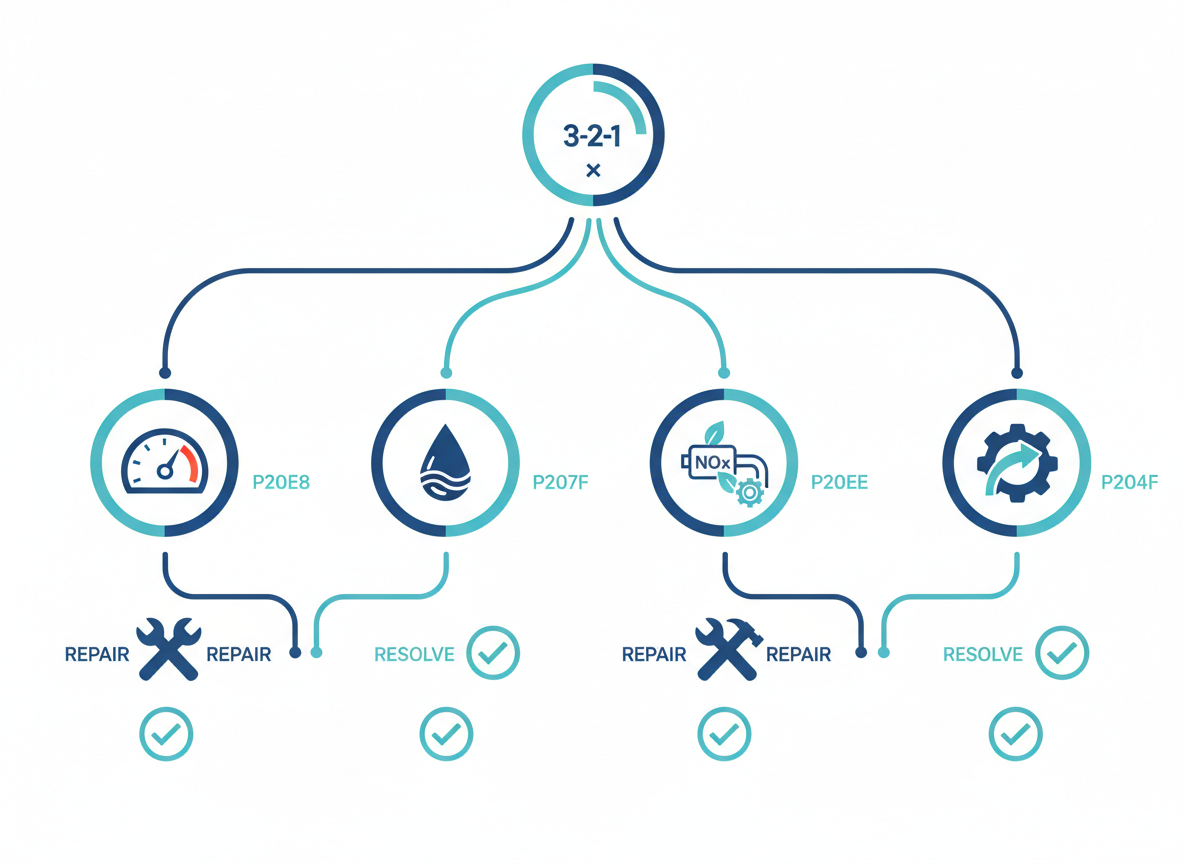
Fast triage map: symptom → next step
Use this when you need a quick decision.
Match what you see to the next sensible move.
Countdown + P20E8
- Focus on pressure behaviour and restrictions.
- Crystals and injector restrictions can mimic pump failure.
- Don’t replace parts until you know if pressure drops under demand.
Go to:
P20E8 low pressure.
Countdown + P20EE
- Focus on NOx behaviour under load.
- Check for small exhaust leaks near sensor locations.
- Injector spray and catalyst efficiency matter.
Go to:
P20EE efficiency.
Countdown + P207F
- Don’t assume it is always “bad fluid”.
- Quality logic can be triggered by contamination or plausibility issues.
- Focus on proving the cause before draining anything.
Go to:
P207F guide.
Countdown but you only see a dash message
- Get the codes first.
- A “top up” may hide the real issue if a code sits in memory.
- Don’t rely on message wording alone.
Start with:
SID212EVO master guide.
Why topping up AdBlue often fails to stop the countdown
Topping up fixes one thing.
Low level.
That is it.
If the ECU is enforcing a countdown, it usually already failed another check.
Pressure.
Performance.
Quality logic.
Efficiency.
A full tank doesn’t make those pass.
You top up.
You clear the message.
It returns after a short drive.
That return means the ECU re-ran the test and it still failed.
How to stop the SID212EVO countdown without guesswork
You stop the countdown by doing two things.
Fix the cause.
Then make sure the ECU can see the system now passes its checks.
- Identify the failing check from the code and freeze-frame data.
- Repair the root cause (not the most talked-about part online).
- Clear faults the right way so the ECU resets the monitoring state.
- Prove it holds with a drive cycle and re-check for pending faults.
If you’re stuck in “clear and it comes back”, use:
Reset SID212EVO faults: what works and what fails.

We come to you, diagnose the failing SCR check, and fix what’s actually caused it.
If you want the full SID212EVO overview:
SID212EVO master guide.
Ford SID212EVO no-start countdown FAQ
Usually yes until it reaches zero.
After that, some vehicles will block starting.
If it’s your work van, don’t gamble with it.
Only if low level caused the warning and no other faults exist.
If you have P20E8, P204F, P207F, or P20EE stored, topping up will not fix the failed check.
You can sometimes clear messages, but if the system still fails its check, it returns.
Use:
Reset guide.
Pull the exact codes and follow the correct test path.
Start with the hub:
SID212EVO master guide.